
29 Jan What Is IRS Tax Exempt Organization Search (TEOS) and Why Does It Matter?
Short Answer
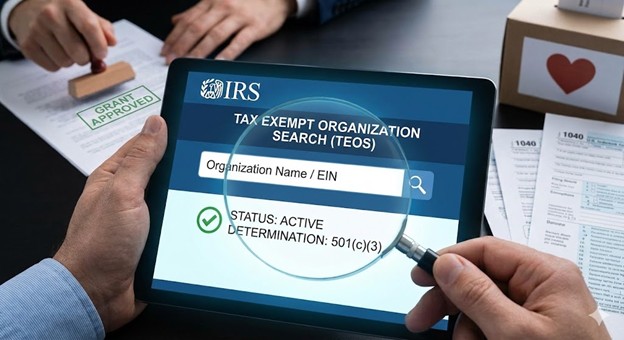
IRS Tax Exempt Organization Search (TEOS) is the official public database at apps.irs.gov/app/eos where anyone can verify an organization’s current federal tax-exempt status, search by organization name or EIN, and view determination details including effective date and exempt status type. TEOS matters because funders independently verify 501(c)(3) recognition by searching this database before approving grants, the listing provides instant public proof of legitimate tax-exempt status that organizational claims alone cannot offer, donors verify organizations before making tax-deductible contributions, and absence from TEOS or showing “revoked” status triggers immediate rejection of grant applications regardless of program quality or organizational claims about tax-exempt status.
What information does TEOS provide and how do you use it?
Organization name and EIN display as primary identifiers. Searching TEOS by either organization name or Employer Identification Number returns the organization’s official listing showing legal name, DBA names if applicable, and EIN. This information confirms the organization exists in IRS records and matches the entity seeking grants or donations.
Exempt status designation shows what type of recognition exists. Most charitable nonprofits show “501(c)(3) – Public Charity” though some show “501(c)(3) – Private Foundation” or other subsections. The designation confirms not just general tax-exempt status but specifically the 501(c)(3) charitable organization classification that most funders require. Organizations showing other classifications like 501(c)(4), 501(c)(6), or 501(c)(7) are tax-exempt but don’t qualify for 501(c)(3)-restricted grants.
Deductibility status indicates whether donations are tax-deductible. The TEOS listing states “Contributions are deductible” for active 501(c)(3) organizations in good standing. This language provides donors the assurance they need to claim deductions. If TEOS shows revoked status or doesn’t show deductibility language, donors cannot legitimately claim tax deductions even if the organization tells them they can.
Effective date of recognition shows when tax-exempt status began. This date typically matches the organization’s incorporation date for organizations approved through normal determination processes, or shows the date determination was granted if delayed beyond incorporation. The effective date matters for determining how long the organization has operated as a recognized charity, which some funders consider when evaluating organizational maturity.
Why do funders check TEOS and what are they verifying?
Independent verification prevents fraud and misrepresentation. Funders don’t simply trust organizational claims about tax-exempt status—they independently verify by searching TEOS. This protects funders from organizations falsely claiming 501(c)(3) status, organizations that lost recognition through revocation but haven’t disclosed it, or situations where founders genuinely but mistakenly believe they’re tax-exempt based on California incorporation alone.
Grant eligibility requirements typically mandate “eligible to receive tax-deductible contributions” as shown in TEOS. Many foundation and corporate grant programs explicitly require grantees to appear in TEOS with current active status. Organizations not in TEOS or showing revoked status fail this threshold eligibility test before program evaluation even begins. The automatic rejection occurs regardless of how compelling the program proposal or how genuine the community need.
Due diligence documentation for grant files requires proof of tax-exempt status. When funders award grants, their records must document that recipient organizations qualified under internal policies and IRS requirements. A TEOS printout showing current active status dated at the time of grant decision provides this documentation. Funders cannot complete grant awards to organizations they cannot verify in TEOS.
Public accountability allows transparency about tax-exempt recognition. TEOS makes federal tax-exempt status publicly verifiable by anyone—potential donors, community members, regulators, or partners. This transparency serves the public interest by preventing organizations from falsely claiming charitable status and ensures that entities receiving special tax treatment (exemption from federal income tax plus donor deductibility) meet federal standards for charitable operations.
Framework: Launch → Fix → Fund + Federal Recognition + CA Compliance Triangle
Launch includes ensuring TEOS listing appears correctly after IRS determination. San Bernardino nonprofits should verify their TEOS entry shows accurate organization name, correct EIN, proper exempt status (501(c)(3) Public Charity), and “Contributions are deductible” language immediately after receiving determination letters.
Fix addresses situations where TEOS shows problems—revoked status requiring reinstatement applications, incorrect information requiring IRS correction, or complete absence from database despite believing the organization has recognition (usually indicating determination was never actually granted).
Fund absolutely depends on clean TEOS listings. Grant applications commonly instruct applicants to “verify your organization appears in IRS TEOS database” and funders independently search before making awards. Organizations not showing current active status in TEOS cannot successfully pursue institutional grants.
Federal Recognition is what TEOS verifies. The database confirms that IRS granted 501(c)(3) determination, that the organization remains in good standing through required filings, and that donor contributions are deductible.
CA Compliance Triangle operates independently but funders verify both federal TEOS status AND California agency status across all three. Having clean TEOS listing doesn’t compensate for California suspension, and vice versa—organizations need current standing in TEOS plus all three California agencies
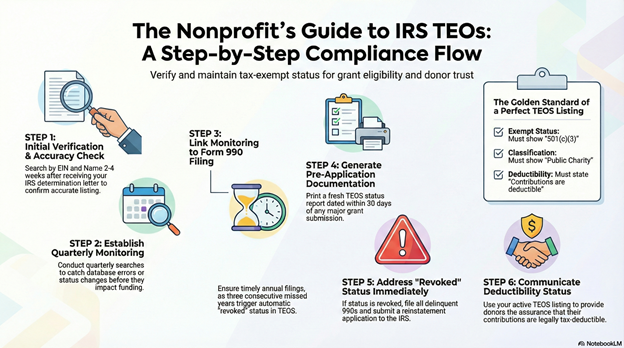
Step-by-step: How NPLO helps organizations maintain clean TEOS status
Step 1: Initial Verification We search TEOS immediately after clients receive determination letters confirming listings appear correctly.
Step 2: Information Accuracy Check We verify organization name, EIN, exempt status designation, and deductibility language match expectations.
Step 3: Correction Requests If TEOS shows incorrect information, we help prepare IRS correspondence requesting corrections.
Step 4: Quarterly Monitoring We establish routines checking TEOS quarterly ensuring status remains current and no revocation flags appear.
Step 5: Filing Compliance Connection We link TEOS monitoring to Form 990 filing compliance since missed filings trigger automatic revocation visible in TEOS.
Step 6: Grant Application Preparation Before major grant applications, we generate current TEOS printouts documenting active status.
Step 7: Problem Resolution If TEOS shows revoked status, we guide reinstatement applications restoring recognition and database listing.
Step 8: Donor Communication We help organizations communicate TEOS verification to major donors providing confidence about deductibility.
Checklist: What to verify in your TEOS listing
- Organization appears when searching by name
- Organization appears when searching by EIN
- Legal name displays correctly
- EIN is accurate
- Exempt status shows “501(c)(3)”
- Classification shows “Public Charity” (or “Private Foundation” if applicable)
- Deductibility statement reads “Contributions are deductible”
- No “revoked” flags or warnings
- Effective date matches incorporation or determination date
- Address information is reasonably current
- Any DBA names are listed if relevant
- No confusing duplicate entries
- Listing updated after any IRS correspondence correcting information
Quick Answers (PPA)
How quickly does TEOS update after we receive our determination letter? TEOS typically updates within 2-4 weeks after IRS issues determination letters. However, processing delays can extend this timeline to 6-8 weeks occasionally. After receiving your determination letter, search TEOS weekly until your listing appears. If 8+ weeks pass without appearing, contact IRS Tax Exempt and Government Entities division to inquire about update status. Don’t assume TEOS automatically updated immediately—verify it actually shows correctly before telling donors or funders you’re listed.
What if TEOS shows our organization is revoked—what does that mean and can it be fixed? Revoked status means IRS terminated your tax-exempt recognition, most commonly through automatic revocation for failing to file required Form 990 returns for three consecutive years. Organizations showing revoked status are no longer tax-exempt, cannot tell donors contributions are deductible, and cannot qualify for grants requiring active 501(c)(3) status. However, revocation can be fixed through retroactive reinstatement applications if you act within specific timeframes after revocation. File all delinquent Form 990 returns immediately, then submit Form 1023 or 1024 requesting retroactive reinstatement. If approved, TEOS updates showing active status restored. The process takes months, so prevention through timely filing is far better than revocation remediation.
Can we tell donors their contributions are deductible if we’re not in TEOS yet but have applied for recognition? No, not legitimately. Until you receive IRS determination and appear in TEOS showing “Contributions are deductible,” donations are not tax-deductible. Organizations can accept donations while determination applications are pending but must clearly disclose to donors that contributions are not yet deductible and that deductibility is contingent on IRS approval. If determination is granted and organization applied within 27 months of incorporation, the effective date will be retroactive allowing donors during that period to claim deductions retroactively. But you cannot claim deductibility before IRS actually grants it—doing so constitutes fraudulent misrepresentation.
What if someone searches TEOS and finds multiple similar organizations—how do they know which is ours? This common problem occurs when similar organization names exist or when organizations have changed names. TEOS searchers should verify by cross-checking EIN—your determination letter, Form 990 filings, and organizational documents all show the same EIN that should match the TEOS entry. Also compare addresses and location information. When providing TEOS information to donors or funders, give them your exact legal name AND EIN to search, reducing confusion. If your organization has a DBA (doing business as) name different from legal name, note this in communications so people understand which TEOS entry is correct.
Does TEOS show anything about California state compliance, or only federal IRS status? TEOS shows only federal IRS tax-exempt recognition—it contains zero information about California Secretary of State status, Franchise Tax Board exemption, or Attorney General Registry registration. This is why funders must verify organizations across multiple databases. A clean TEOS listing proves federal recognition but doesn’t demonstrate California compliance. Similarly, current California status doesn’t prove federal recognition. Grant-ready organizations need verification showing both: current TEOS listing (federal) plus current status with all three California agencies. Never assume one verification covers the others.
What to do next (DIY vs Done-With-You)
DIY approach: Search IRS TEOS database at apps.irs.gov/app/eos using both your organization’s exact legal name and EIN separately. Verify that listings from both searches match and show the same organization. Review the displayed information carefully—confirm organization name is correct (or close enough given database limitations), verify EIN is accurate, check that exempt status shows “501(c)(3)” and classification shows “Public Charity,” and confirm deductibility statement reads “Contributions are deductible” without revocation warnings. Take dated screenshots or printouts of your TEOS listing for your records and for providing to funders when requested. If information is incorrect or your organization doesn’t appear despite having received determination, contact IRS Tax Exempt and Government Entities division requesting corrections or investigating the absence. Establish quarterly calendar reminder to check TEOS ensuring status remains current and catching any problems early. Before major grant applications, generate fresh TEOS printouts dated within 30 days for funder due diligence files. If TEOS shows revoked status, file all delinquent Form 990 returns immediately and consult tax professionals about reinstatement procedures.
Done-With-You approach: The Nonprofit Launch Office provides comprehensive TEOS verification and monitoring for San Bernardino and Inland Empire nonprofits. We search TEOS after clients receive determinations confirming listings appear correctly, verify all information displayed matches organizational records accurately, request IRS corrections if information is wrong or missing, establish quarterly monitoring routines catching status changes or problems early, link TEOS monitoring to Form 990 filing compliance preventing automatic revocation, generate current TEOS printouts for grant applications documenting active status, guide reinstatement applications if organizations show revoked status, and prepare donor communications explaining how to verify deductibility through TEOS searches. This ensures your organization maintains the clean, current TEOS listing that funders and donors verify when evaluating whether to support your work.
Contact
Book: https://thedocumentpro.com/
Call: 1(800) 285-0078
Email: mydocumentpro@gmail.com
The Nonprofit Launch Office™ — a discipline of The Document Pro, operated by Gitta Williams.
Operated by The Document Pro (Gitta Williams)
Find Us Locally
Service Area: Moreno Valley, CA and surrounding areas
Coordinates: 33.9535, -117.2081
Address: 23945 Sunnymead Blvd. #4, Moreno Valley, CA 92553
Sources
- https://www.irs.gov/charities-non-profits/charitable-organizations
- https://www.irs.gov/forms-pubs/about-form-1023
- https://calnonprofits.org/
Disclaimer
Document preparation and nonprofit readiness support — not legal or tax advice.